reading-notes
Class-10 reading Summary
Duckett JavaScript book Chapter 10 : Error Handling & Debugging
ORDER OF EXECUTION
To find the source of an error, it helps to know how scripts are processed. The order in which statements are executed can be complex; some tasks cannot complete until another statement or function has been run.
EXECUTION CONTEXTS
The JavaScript interpreter uses the concept of execution contexts.
There is one global execution context; plus, each function creates a new
new execution context. They correspond to variable scope.
If you understand execution contexts (which have two
stages) and stacks, you are more likely to find the error
in your code.
EXECUTION CONTEXT & HOISTING
Each time a script enters a new execution context, there are two phases of activity:
- PREPARE
- EXECUTE
If a JavaScript statement generates an error, then it throws an exception. At that point, the interpreter stops and looks for exception-handling code.
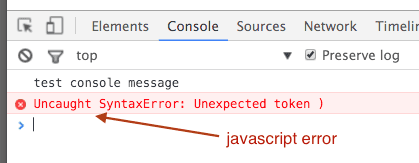
Error objects can help you find where your mistakes are and browsers have tools to help you read them.
Types of Errors:
JavaScript has 7 different types of errors. Each creates its own error object, which can tell you its line number and gives a description of the error.
-
Error: Generic error - the other errors are all based upon this error.
-
Syntax Error: Syntax has not been followed.
-
Ref erenceError: Tried to reference a variable that is not declared/within scope.
-
TypeError: An unexpected data type that cannot be coerced.
-
Range Error: Numbers not in acceptable range.
-
URI Error:
encodeURI (),decodeURI(),and similar methods used incorrectly. -
EvalError:
eval ()function used incorrectly
HOW TO DEAL WITH ERRORS:
The console helps narrow down the area in which the error is located, so you can try to find the exact error.

If you know that you may get an error, you can handle it gracefully using the try, catch, finally statements. Use them to give your users helpful feedback.