reading-notes
Class-08 reading Summary
Duckett HTML book Chapter 15 : Layout
Key Concepts in Positioning Elements
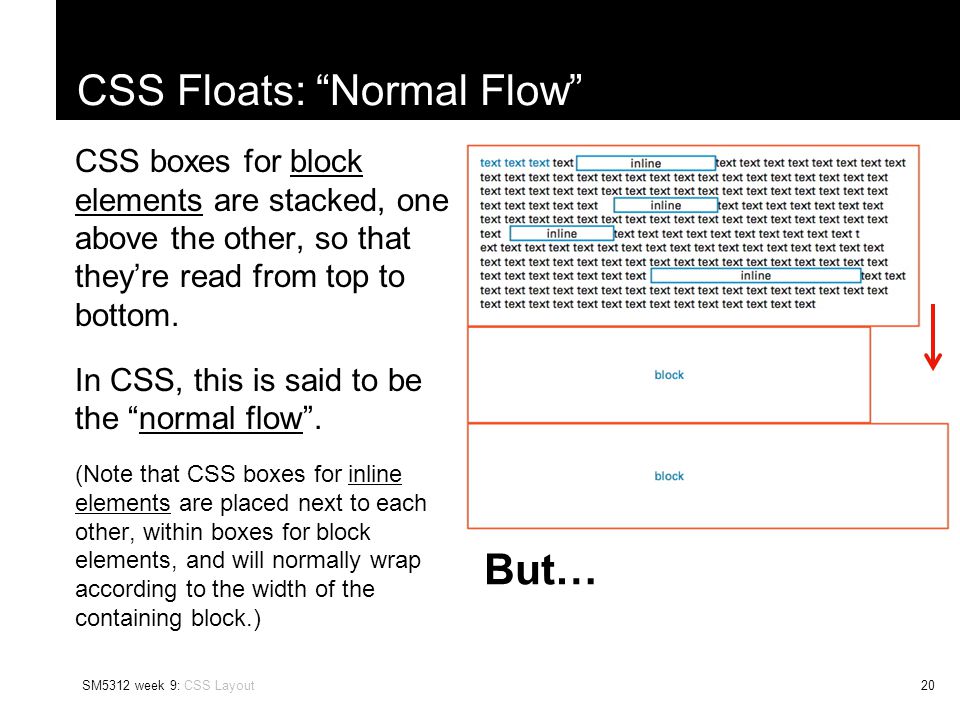
- Building Blocks CSS treats each HTML element as if it is in its own box. This box will either be a block-level box or an inline box.
- Block-level elements: start on a new line.
- Inline elements: flow in between surrounding text.
Containing Elements
If one block-level element sits inside another block-level element then the outer box is known as the containing or parent element.
Normal Flow
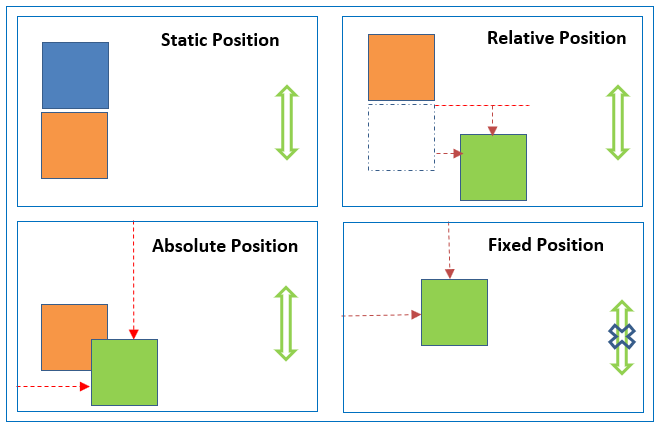
Relative, Static, Absolute and Fixed Positioning:
Floating Elements
The float property allows you to take an element in normal flow and place it as far to the left or right of the containing element as possible. Anything else that sits inside the containing element will flow around the element that is floated. When you use the float property, you should also use the width property to indicate how wide the floated element should be. If you do not, results can be inconsistent but the box is likely to take up the full width of the containing element (just like it would in normal flow).

Clearing Floats (clear)
The clear property allows you to say that no element (within the same containing element) should touch the left or righthand sides of a box. It can take the following values:
- left
The left-hand side of the box should not touch any other elements appearing in the same containing element.
- right
The right-hand side of the box will not touch elements appearing in the same containing element.
- both
Neither the left nor right-hand sides of the box will touch elements appearing in the same containing element.
- none
Elements can touch either side.