reading-notes
Duckett HTML book Chapter 5 : Images
There are many reasons why you might want to add an image to a web page: you might want to include a logo, photograph, illustration, diagram, or chart.
Adding Images
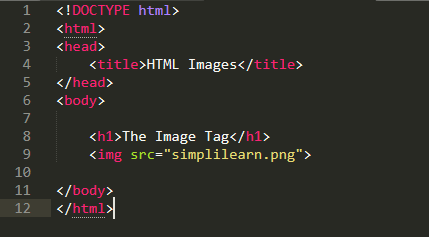
To add an image into the page you need to use an < img > element. This is an empty element (which means there is no closing tag). It must carry the following two attributes:
- src
- alt
You will also often see an < img > element use two other attributes that specify its size:
height
This specifies the height of the image in pixels.
width
This specifies the width of the image in pixels.
Three Rules for Creating Images:
- Save images in the right format.
- Save images at the right size.
- Use the correct resolution.
Duckett HTML book Chapter 11 : Color
rgb values:
RGB (red, green, and blue) refers to a system for representing the colors to be used on a computer display. Red, green, and blue can be combined in various proportions to obtain any color in the visible spectrum. Levels of R, G, and B can each range from 0 to 100 percent of full intensity. Each level is represented by the range of decimal numbers from 0 to 255 (256 levels for each color).

hex codes:
Hex codes are a hexadecimal format for identifying colors. This is a system used in HTML, CSS and SVG. Each hex code refers to a very specific color, which allows for two designers or a designer and developer to be on the same page about what exact light blue (or any other color) they are referring to. They are always a six-digit code, which contains three pieces of information:
- The first two digits provide information about the amount of Red in a color
- The second two digits provide information about the amount of Green
- The last two digits provide information about the amount of Blue.
color names
There are 147 predefined color names that are recognized by browsers.
Opacity

HSL Colors
-
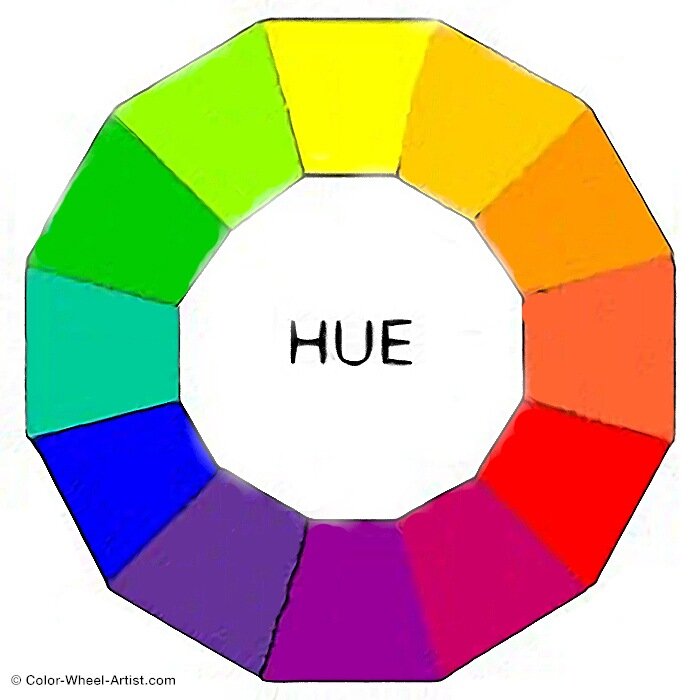
hue Hue is the colloquial idea of color. In HSL colors, hue is often represented as a color circle where the angle represents the color, although it may also be shown as a slider with values from 0 to 360.
-
saturation Saturation is the amount of gray in a color. Saturation is represented as a percentage. 100% is full saturation and 0% is a shade of gray.

Duckett HTML book Chapter 12 : Text
- There are properties to control t XX he choice of font, size, weight, style, and spacing.
- There is a limited choice of fonts that you can assume most people will have installed.
- If you want to use a wider range of typefaces there are several options, but you need to have the right license to use them.
- You can control the space between lines of text, individual letters, and words. Text can also be aligned to the left, right, center, or justified. It can also be indented.
- You can use pseudo-classes to change the style of an element when a user hovers over or clicks on text, or when they have visited a link.
JPEG vs PNG vs GIF
-
Use JPEG format for all images that contain a natural scene or photograph where variation in colour and intensity is smooth.
-
Use PNG format for any image that needs transparency or for images with text & objects with sharp contrast edges like logos.
-
Use GIF format for images that contain animations.