reading-notes
Class-03 reading
Duckett HTML book Chapter 3 : Lists
There are lots of occasions when we need to use lists. HTML provides us with three different types:
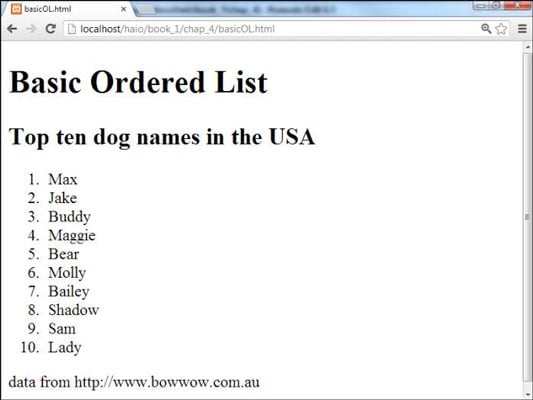
- Ordered lists are lists where each item in the list is numbered. For example, the list might be a set of steps for a recipe that must be performed in order, or a legal contract where each point needs to be identified by a section number.
The ordered list is created with the
<ol>element. Each item in the list is placed between an opening<li>tag and a closing</li>tag.
- Unordered lists are lists that begin with a bullet point (rather than characters that indicate order).
The unordered list is created with the
<ul>element. Each item in the list is placed between an opening<li>tag and a closing</li>tag.

- Definition lists are made up of a set of terms along with the definitions for each of those terms.
Duckett HTML book Chapter 13 : Boxes
Box Dimensions: Width,height
By default a box is sized just big enough to hold its contents. To set your own dimensions for a box you can use the height and width properties. The most popular ways to specify the size of a box are to use pixels, percentages, or ems. Traditionally, pixels have been the most popular method because they allow designers to accurately control their size. When you use percentages, the size of the box is relative to the size of the browser window or, if the box is encased within another box, it is a percentage of the size of the containing box. When you use ems, the size of the box is based on the size of text within it. Designers have recently started to use percentages and ems more for measurements as they try to create designs that are flexible across devices which have different-sized screens.
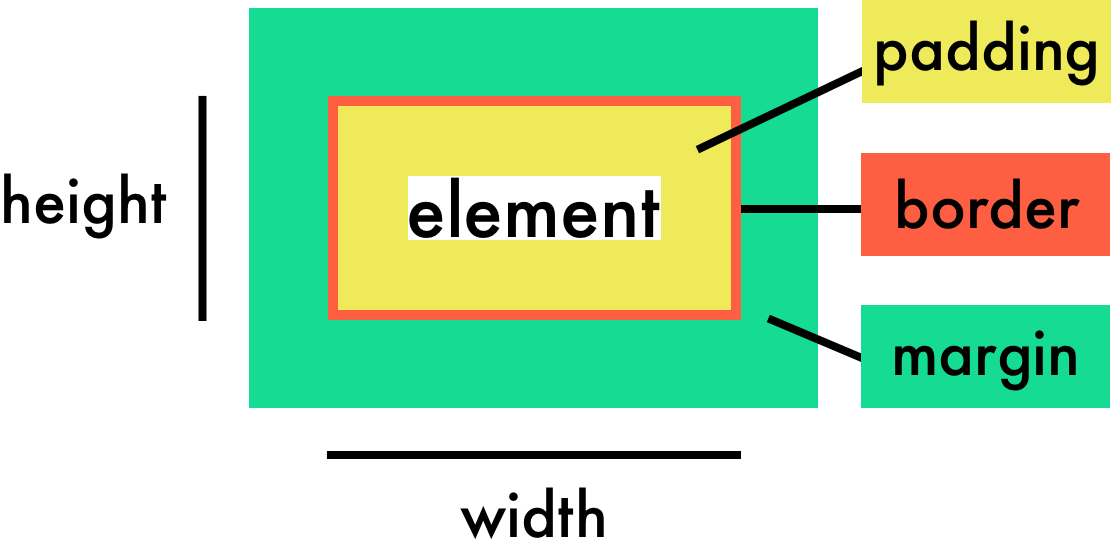
Every box has three available properties that can be adjusted to control its appearance:
- Border
- Margin
- Padding
Limiting Width: min-width, max-width
Some page designs expand and shrink to fit the size of the user’s screen. In such designs, the min-width property specifies the smallest size a box can be displayed at when the browser window is narrow, and the max-width property indicates the maximum width a box can stretch to when the browser window is wide.
Limiting Height: min-height, max-height
In the same way that you might want to limit the width of a box on a page, you may also want to limit the height of it. This is achieved using the min-height and max-height properties.
Overflowing Content: overflow
The overflow property tells the browser what to do if the content contained within a box is larger than the box itself. It can have one of two values:
- hidden
- scroll

Border Width: border-width
The border-width property is used to control the width of a border. The value of this property can either be given in pixels or using one of the following values:
- thin
- medium
- thick

Duckett JavaScript book Chapter 4 : Decisions and Loops
For loob
The JavaScript for loop statement allows you to create a loop with three optional expressions. The following illustrates the syntax of the for loop statement:

* initialization
The initialization expression initializes the loop. The initialization expression is executed only once when the loop starts. You typically use the initialization is to initialize a counter variable. If you use the var keyword to declare the counter variable, the variable will have either function or global scope. In other words, you can reference the counter variable after the loop ends. However, if you use the let keyword to declare the counter variable, the variable will have a blocked scope, which is only accessible inside the loop.
* condition
The condition is an expression that is evaluated once before every iteration. The statement inside the loop is executed only when the condition evaluates to true. The loop is terminated if the condition evaluates to false. Note that the condition is optional. If you omit it, the for loop statement considers it as true.
* Update
While loop
The while loop loops through a block of code as long as a specified condition is true.
while (Condition) {
  // code block to be executed
}